


Mobile experiences have become an important part of how customers discover products, interact with brands, access services, and complete transactions. As businesses have been moving more of their operations to mobile platforms, two development approaches have received significant attention: Progressive Web Apps (PWAs) and native mobile applications.
A PWA is built using web technologies while providing many app-like capabilities, including installation, offline functionality, notifications, and standalone experiences. A native app, on the other hand, is developed specifically for an operating system such as iOS or Android and is generally distributed through an app store.
Both approaches can be used to create high-quality digital products, but different technical and business requirements are involved. Development cost, performance, device capabilities, distribution, maintenance, user acquisition, security, and scalability can all be affected by the choice that is made.
For some businesses, a PWA can provide broad reach through a single web-based application. For others, the deeper device integration and platform-specific performance of native applications may be required.
The right approach should therefore not be selected simply because one technology is considered newer or more popular. Instead, the decision should be based on the target audience, product requirements, business model, expected usage, budget, technical complexity, and long-term growth plans. This guide explains PWA vs. native app development, including differences in cost, performance, features, development time, security, scalability, maintenance, user experience, and business benefits.
What Is a Progressive Web App?
A Progressive Web App is a web application that has been enhanced with modern web capabilities to provide a more app-like experience. Unlike a traditional website, a PWA can be designed to support installation on compatible devices. Once installed, it can appear with an application icon and can be launched in a standalone window without the normal browser interface.
PWAs are generally developed using technologies such as:
- HTML
- CSS
- JavaScript
- React
- Angular
- Vue.js
- Node.js
- Service workers
- Web App Manifest
- Web APIs
A service worker can be used to support caching, offline experiences, background processing, and other functionality. One of the major advantages of the PWA approach is that the same web-based application can be made accessible across multiple operating systems and device types. A PWA can also remain discoverable through the web because it is accessed through a URL. This can provide an important distribution advantage compared with applications that depend primarily on app stores.
What Is a Native App?
A native app is developed specifically for a particular operating system.
For example:
- Swift can be used for iOS development.
- Kotlin can be used for Android development.
Native applications are generally distributed through platform-specific app stores and are designed to work closely with the operating system. Native development can provide deeper access to device capabilities, platform APIs, hardware features, background processes, and performance optimizations.
Native applications are commonly used when sophisticated functionality is required, such as:
- Advanced camera functionality
- Bluetooth communication
- GPS-intensive applications
- High-performance gaming
- Augmented reality
- Advanced background processing
- Wearable integrations
- Complex hardware interaction
- High-performance media processing
The development approach can also provide more control over platform-specific user interface patterns.
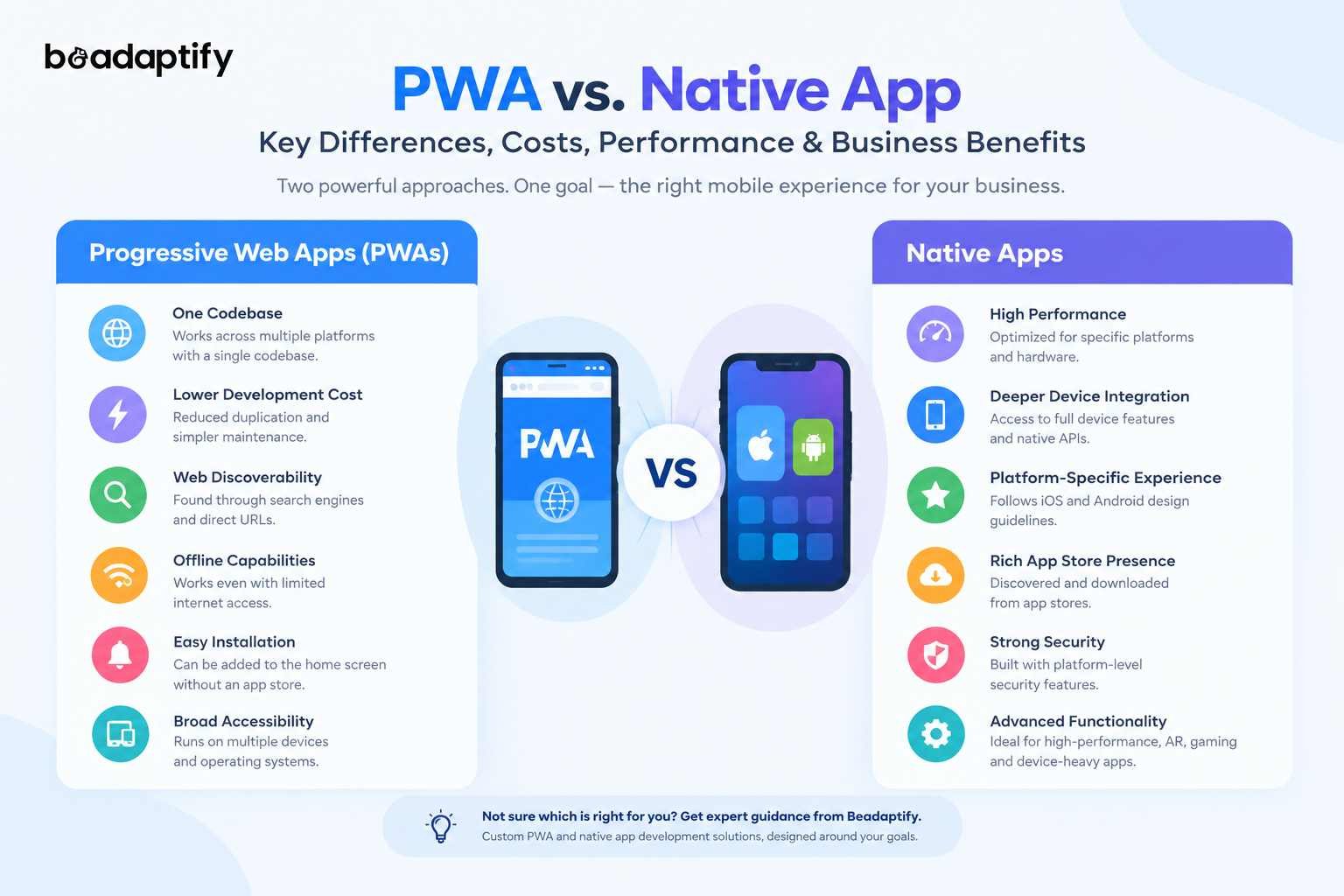
PWA vs. Native App: Key Differences
The fundamental difference is related to how the applications are built and delivered.
Factor |
PWA |
Native App |
|---|---|---|
| Development | Web technologies | Platform-specific technologies |
| Platforms | Multiple platforms from one codebase | Usually separate iOS and Android codebases |
| Installation | Web or supported app stores | Primarily app stores |
| Discoverability | Search engines and URLs | App stores and direct campaigns |
| Offline Support | Possible with service workers and caching | Strong platform support |
| Performance | High when well optimized | Generally strongest for platform-specific workloads |
| Device Access | Available APIs vary by platform/browser | Broad platform API access |
| Updates | Often delivered through the web | Usually distributed through app update mechanisms |
| Development Cost | Often lower for multi-platform delivery | Often higher when separate native apps are required |
| Maintenance | One primary codebase can reduce duplication | Separate platform codebases may be maintained |
| SEO | Web discoverability can be supported | Limited direct SEO discoverability |
| App Store Dependency | Not always required | Generally important for distribution |
The comparison should not be interpreted as meaning that PWAs are always cheaper or native applications are always better performing. Project architecture, functionality, optimization, team expertise, and device requirements can significantly change the outcome.
PWA vs. Native App: Development Cost
Cost is one of the first considerations when a mobile product is being planned.
However, the total development cost should not be calculated only from the number of screens. Architecture, backend requirements, integrations, security, testing, device support, advanced functionality, and long-term maintenance should also be considered.
Estimated PWA Development Cost
A general planning range can be structured as follows:
PWA Complexity |
Estimated Cost |
|---|---|
| Basic PWA | $10,000–$25,000 |
| Standard PWA | $25,000–$50,000 |
| Advanced PWA | $50,000–$100,000+ |
| Enterprise PWA | $100,000–$200,000+ |
These figures should be treated as planning estimates rather than fixed quotations. A basic PWA with authentication, responsive interfaces, forms, dashboards, and limited integrations can generally require less development effort than an enterprise application containing complex workflows, real-time features, advanced analytics, and multiple integrations.
Estimated Native App Development Cost
Native development can require a larger investment when separate applications are developed for iOS and Android.
Native App Complexity |
Estimated Cost |
|---|---|
| Basic Native App | $20,000–$40,000 |
| Standard Native App | $40,000–$80,000 |
| Advanced Native App | $80,000–$150,000 |
| Enterprise Native App | $150,000–$300,000+ |
If both iOS and Android applications are developed independently, design, development, testing, deployment, and maintenance costs can increase. The final cost will depend on the number of platforms, complexity of features, backend architecture, integrations, security requirements, and development team structure.
Why Can PWA Development Cost Less?
One of the primary financial advantages of PWAs can be associated with their cross-platform nature. A single web-based application can be developed to support multiple device categories rather than requiring entirely separate native applications.
This can reduce duplication across:
- UI development
- Frontend development
- Business logic
- Testing
- Deployment
- Maintenance
- Feature updates
However, savings should not be assumed automatically. A highly sophisticated PWA can still require significant investment, particularly when advanced backend systems, offline synchronization, real-time functionality, authentication, payment processing, or complex integrations are required. Professional progressive web app development services can be used to identify where a PWA architecture can provide genuine cost advantages without compromising the product experience.
PWA vs. Native App: Performance Comparison
Performance is one of the most important areas of comparison. Native applications can provide excellent performance because they are designed specifically for the target operating system and can make direct use of platform-specific capabilities.
PWAs can also provide strong performance when modern web technologies, efficient architecture, caching strategies, and optimized assets are used. PWAs can use service workers to support fast loading and offline experiences, with cached resources being served from the device rather than being requested repeatedly from a network. Performance can therefore depend heavily on implementation quality.
Native Performance Advantages
Native applications can be preferred when:
- High frame rates are required.
- Heavy graphics processing is involved.
- Advanced camera processing is needed.
- Real-time hardware interaction is required.
- Intensive background tasks are performed.
- Complex AR or gaming experiences are being developed.
- Platform-specific APIs are heavily used.
PWA Performance Advantages
PWAs can perform well when:
- Fast web delivery is important.
- Content is frequently accessed.
- Efficient caching is required.
- Offline access is useful.
- Lightweight interfaces are being developed.
- Cross-platform access is prioritized.
Performance should therefore be evaluated based on actual product requirements rather than technology labels.
PWA vs. Native App: User Experience
User experience can be influenced by loading speed, navigation, interaction patterns, installation, notifications, offline access, and platform behavior. A well-designed PWA can provide an app-like experience after installation. An installed PWA can use standalone display modes, allowing the browser interface to be hidden while the application is being used.
Native apps can provide highly platform-specific experiences because interface behavior can be designed around iOS or Android conventions. For example, platform-specific navigation, gestures, permissions, animations, widgets, and system integrations can be incorporated more deeply into native applications. For either approach, professional design & development services should be used to ensure that usability and technical implementation remain aligned.
PWA vs. Native App: Installation and Distribution
Distribution represents another major difference. A native application is generally discovered and downloaded through an app store.
A PWA can be accessed directly through a URL and can also be installed on supported devices. Once installed, it can receive an application icon and operate in a standalone mode. This can reduce the friction associated with asking users to visit an app store before trying the product.
PWAs can therefore be useful for businesses where quick access and broad reach are important. At the same time, native applications can benefit from app-store visibility, established installation flows, platform-level integrations, and familiar user expectations. The appropriate distribution model should be determined based on how customers are expected to discover and use the product.
PWA vs. Native App: Offline Functionality
Offline functionality can be implemented in both approaches, but it is handled differently. PWAs can use service workers and caching mechanisms to store resources locally and provide functionality when network connectivity is limited or unavailable.
Offline capabilities can be particularly valuable for:
- Content applications
- Travel applications
- Field-service systems
- Retail applications
- Productivity tools
- Inventory interfaces
- Educational platforms
Native applications can generally provide deeper offline capabilities because local storage and background processing can be integrated directly with the operating system. For applications that must remain highly functional without connectivity, the offline architecture should be evaluated during the initial planning stage.
PWA vs. Native App: Device Capabilities
Device capability is an area where native applications can have an advantage. Native applications can generally access a broad range of operating-system APIs and hardware capabilities. Depending on the platform and browser, PWAs can also access many device capabilities, but support can vary.
Modern PWAs can use capabilities related to:
- Camera
- Location
- Notifications
- File handling
- Sharing
- Storage
- Bluetooth
- Media
- Sensors
However, browser and operating-system support should be checked for every important feature before development begins. MDN recommends that PWAs be tested across browsers and operating systems because capabilities and behavior can vary between environments. Therefore, device-dependent products should be evaluated carefully before a PWA architecture is selected.
PWA vs. Native App: SEO and Discoverability
SEO is a major advantage associated with web-based applications. Because a PWA is accessed through web URLs, its public content can potentially be discovered through search engines. This can be particularly valuable for:
- eCommerce platforms
- Travel platforms
- Publishing websites
- Marketplaces
- Educational platforms
- Service directories
- Content-driven businesses
A native application cannot provide the same direct search-engine discovery model for its application interface. A native app can still be promoted through web pages, app-store optimization, advertising, social media, and other acquisition channels, but the application itself is not equivalent to a web-accessible experience. For businesses where organic acquisition is important, this distinction should be included in the platform evaluation.
PWA vs. Native App: Security
Security should be treated as a core product requirement regardless of the chosen architecture. For PWAs, security measures can include:
- HTTPS
- Secure authentication
- Secure cookies
- Content Security Policy
- Input validation
- API authentication
- Authorization controls
- Secure storage
- Dependency management
- Security monitoring
HTTPS is also required for normal PWA installability, apart from local development environments.
Native applications can also be protected through:
- Secure authentication
- Encrypted storage
- Certificate validation
- Secure API communication
- Biometric authentication
- Platform security mechanisms
- Code protection
- Runtime monitoring
Security should therefore be designed into the application architecture rather than added near launch.
PWA vs. Native App: Maintenance
Maintenance can become a significant long-term cost. With a PWA, updates can generally be deployed through the web infrastructure. Users do not necessarily need to download a separate application update for every frontend change.
This can simplify:
- Bug fixes
- Content updates
- UI changes
- Feature improvements
- Security patches
- Performance optimization
Native applications require platform-specific release processes. When separate iOS and Android applications are maintained, changes may need to be implemented, tested, and released for both platforms. For large products, this can increase ongoing engineering requirements. However, native applications can provide more platform-specific control, which may justify the additional maintenance effort for complex products.
Business Benefits of Progressive Web Apps
A PWA can provide several business benefits when its capabilities align with business requirements.
Lower Cross-Platform Development Duplication
A common web technology stack can be used across multiple environments.
Faster Market Entry
Because a separate native application may not be required initially, a product can potentially be introduced more quickly.
Wider Accessibility
Customers can access the product directly through a URL without necessarily installing an application first.
Search Visibility
Public web content can be made discoverable through search engines.
Easier Updates
Many updates can be delivered through the web infrastructure.
Improved Re-Engagement
Push notifications and installation can be used where browser and platform capabilities support them.
Reduced Installation Friction
Users can interact with the product before deciding whether it should be installed. These advantages can make PWAs particularly suitable for customer-facing businesses where reach and accessibility are important.
Business Benefits of Native Apps
Native applications can provide a different set of business benefits.
High Performance
Platform-specific optimization can provide excellent performance.
Deep Device Integration
Native APIs can provide broader access to device capabilities.
Strong Platform Experience
Interfaces can be designed around the conventions of iOS and Android.
Advanced Hardware Usage
Applications requiring sophisticated hardware interaction can benefit from native development.
Rich Notifications
Native platforms provide extensive notification capabilities.
App Store Presence
Native applications can be distributed through established app stores.
Advanced Mobile Experiences
Gaming, AR, media processing, wearable applications, and other demanding experiences can benefit from native architecture.
When Should a PWA Be Chosen?
A PWA can be considered when the following requirements are present:
- Cross-platform accessibility is important.
- Web discoverability is valuable.
- A single codebase is preferred.
- Faster initial market entry is desired.
- The product is primarily content or transaction based.
- Offline access is useful.
- The application does not require extensive native hardware access.
- Installation friction should be minimized.
- Web and mobile experiences need to remain closely connected.
Examples can include:
- eCommerce stores
- News platforms
- Booking systems
- Educational platforms
- SaaS products
- Content platforms
- Marketplaces
- Business dashboards
When Should a Native App Be Chosen?
Native development can be considered when:
- Maximum mobile performance is required.
- Advanced device capabilities are essential.
- Hardware integrations are central to the product.
- Sophisticated AR functionality is required.
- High-performance gaming is involved.
- Wearable integrations are required.
- Intensive background processing is necessary.
- Deep platform integration is important.
- Platform-specific user experiences are required.
Examples can include:
- Gaming applications
- Fitness applications using sensors and wearables
- Advanced financial applications
- Camera applications
- AR applications
- Media applications
- IoT applications
- High-performance enterprise applications
In such cases, mobile application development services can be used to create platform-specific experiences optimized for the required devices.
Can a PWA and Native App Be Used Together?
Yes. A business does not always have to select only one technology. A hybrid product strategy can be implemented in which:
- A PWA provides broad web access.
- A native app provides advanced mobile functionality.
- Shared backend APIs support both platforms.
- Web content supports SEO and customer acquisition.
- Native applications provide deeper device experiences.
This approach can be useful when different customer segments have different requirements. For example, a business could allow new users to access its platform through a PWA while providing a native application for customers who require advanced device functionality. A shared backend can then be used to maintain consistent data across the experiences.
PWA Development Process
A structured PWA development process can help reduce technical and financial risks.
Step 1: Business Requirement Analysis
Business objectives, target users, workflows, platforms, integrations, and performance requirements should be documented.
Step 2: PWA Feasibility Assessment
Browser support and required device capabilities should be evaluated.
Step 3: UX Planning
User journeys, navigation, information architecture, and responsive layouts should be created.
Step 4: UI Design
Visual components, design systems, responsive layouts, and interaction patterns should be developed.
Step 5: Frontend Development
The PWA interface can be developed using modern web technologies.
Step 6: Backend Development
APIs, authentication, databases, business logic, and integrations can be implemented.
Step 7: Service Worker and Caching
Caching strategies, offline behavior, background functionality, and update mechanisms can be configured.
Step 8: Installation Configuration
The Web App Manifest and installation behavior can be implemented.
Step 9: Testing
Testing should be performed across browsers, operating systems, screen sizes, network conditions, and supported devices.
Step 10: Deployment and Monitoring
The application can be deployed through secure web infrastructure and monitored after launch. Professional PWA development services can be used throughout this process to ensure that the application remains scalable, secure, and maintainable.
Native App Development Process
A native application generally follows a platform-specific development lifecycle.
Business Analysis
Business objectives and user requirements are identified.
UX and UI Design
Platform-specific user flows and interfaces are created.
Platform Selection
iOS, Android, or both platforms are selected.
Native Development
Swift, Kotlin, or other platform-specific technologies are used.
Backend Integration
APIs, authentication, databases, and business logic are connected.
Testing
Device-specific functional, performance, security, and usability testing is performed.
App Store Preparation
Store assets, metadata, permissions, privacy information, and release configurations are prepared.
Launch
The application is submitted and released through the appropriate distribution channels.
Maintenance
Updates, bug fixes, compatibility improvements, and new features are delivered over time.
PWA vs. Native App: Development Timeline
Development time will vary based on complexity.
Project Type |
Approximate Timeline |
|---|---|
| Basic PWA | 2–4 months |
| Standard PWA | 3–6 months |
| Advanced PWA | 5–9 months |
| Basic Native App | 3–5 months |
| Standard Native App | 5–8 months |
| Advanced Native App | 8–12+ months |
These ranges are planning estimates. A project involving complex integrations, advanced security, real-time functionality, AI, hardware access, or multiple platforms may require additional development time.
Major Factors Affecting PWA Development Cost
Several factors should be evaluated before a budget is established.
Feature Complexity
Advanced workflows require more development and testing.
UI/UX Requirements
Custom interactions and highly personalized experiences increase design and implementation effort.
Backend Complexity
Real-time systems, complex business logic, analytics, and large databases can increase costs.
Third-Party Integrations
Payment gateways, CRMs, ERPs, shipping systems, analytics platforms, and other APIs can increase project scope.
Offline Requirements
Advanced offline functionality may require additional architecture for synchronization and conflict management.
Security
Authentication, encryption, authorization, monitoring, and compliance requirements can affect development effort.
Browser Compatibility
More supported environments require broader testing.
Major Factors Affecting Native App Development Cost
Native application costs can be affected by:
- Number of platforms
- Number of screens
- UI/UX complexity
- Backend architecture
- Device integrations
- API integrations
- Authentication
- Payment systems
- Offline functionality
- Real-time functionality
- Push notifications
- Analytics
- Security
- App-store requirements
- Ongoing maintenance
Developing both iOS and Android applications independently can increase the overall investment because platform-specific development and testing are required.
How to Reduce PWA and Native App Development Costs
Cost optimization should be performed without compromising essential functionality.
Start With an MVP
Only the most important features should be included in the initial release.
Prioritize Features
Features should be ranked according to business value and user importance.
Reuse Backend Services
A shared backend can be designed to support web, PWA, and native applications.
Use a Scalable Architecture
The architecture should be designed so new functionality can be added without requiring a complete rebuild.
Plan Integrations Early
Third-party services should be identified before development begins.
Invest in UX Planning
Early usability problems can be more expensive to correct after development.
Automate Testing
Automated testing can reduce repetitive QA effort for frequently updated products.
PWA vs. Native App for eCommerce
The choice between a PWA and native app can be particularly important for eCommerce businesses.
A PWA can provide:
- Search engine discoverability
- Fast web access
- Installability
- Cross-platform reach
- Offline capabilities
- Push notifications
- Lower cross-platform duplication
A native eCommerce application can provide:
- Deeper device integration
- Native payment experiences
- Strong mobile performance
- Platform-specific interactions
- Advanced notifications
- Better support for certain device features
For an eCommerce business focused heavily on SEO, rapid accessibility, and web-based customer acquisition, a PWA can be considered. For businesses focused on frequent repeat customers, loyalty programs, advanced device capabilities, and highly personalized mobile experiences, native development may also be evaluated. The final choice should be based on customer behavior and business requirements.
PWA vs. Native App for SaaS Products
SaaS businesses can also benefit from PWA architecture. A SaaS product often needs to be accessible from:
- Desktop computers
- Laptops
- Tablets
- Smartphones
A PWA can provide a consistent experience across these environments through web technologies.
This can be useful for:
- CRM systems
- Project management tools
- HR platforms
- Business dashboards
- Accounting systems
- Collaboration tools
- Customer portals
Native applications may still be useful when mobile-specific workflows, notifications, offline operations, or device capabilities are central to the SaaS product.
PWA vs. Native App for Enterprise Applications
Enterprise applications often involve complex security, integrations, permissions, and workflows. A PWA can be appropriate when employees need access across multiple devices and operating systems. For example, a field-service team could use a PWA for:
- Job management
- Customer information
- Scheduling
- Inventory
- Forms
- Reports
A native application may be preferred when extensive offline functionality, GPS, camera usage, barcode scanning, Bluetooth, or other device capabilities are essential. Enterprise architecture should therefore be selected based on operational requirements rather than development trends.
Common Mistakes When Choosing Between PWA and Native
Choosing Based Only on Cost
A lower initial development cost does not automatically mean a lower total cost of ownership.
Ignoring Browser Compatibility
PWA functionality can vary across browser and operating-system combinations, so compatibility testing should be planned.
Assuming Every PWA Feature Works Everywhere
Device and browser capabilities should be verified before technical decisions are finalized.
Building Native Apps Without Validating Demand
Developing separate applications for multiple platforms before product-market requirements are understood can increase initial investment.
Ignoring Long-Term Maintenance
Architecture should be selected with future updates, integrations, and scaling requirements in mind.
Treating Design as an Afterthought
A technically strong product can still deliver poor results if the user experience is difficult to understand.
How to Choose the Right Development Partner
The technology decision is only one part of a successful product. A development partner should be evaluated based on:
- Relevant technical experience
- PWA development experience
- Native mobile expertise
- UI/UX capabilities
- Backend development skills
- API integration experience
- Security practices
- Testing methodology
- Scalability planning
- Post-launch support
- Communication processes
- Project transparency
A capable progressive web app development company should be able to explain browser compatibility, service-worker architecture, caching, installation, security, and performance rather than treating a PWA as simply a responsive website. Similarly, a provider of mobile app development services should be able to explain platform-specific architecture, device integration, testing, app-store requirements, and long-term maintenance.
Why Choose Beadaptify for PWA and Native App Development?
The right application architecture should be selected according to business goals, customer behavior, technical requirements, and long-term scalability. Beadaptify can support businesses across both web-based and mobile product development requirements, allowing the development approach to be structured around the actual product rather than a fixed technology preference.
From business analysis and UX planning to UI design, frontend development, backend engineering, API integrations, testing, deployment, and ongoing support, the complete product lifecycle can be addressed through an integrated approach. Custom progressive web app development solutions can be created for businesses that require broad accessibility, cross-platform delivery, web discoverability, and app-like functionality. For products that require deeper mobile capabilities, custom mobile app development solutions can be developed for iOS and Android.
Through PWA development services, mobile app development services, and design & development services, the user experience and technical architecture can be aligned with business objectives. The resulting product can also be structured to accommodate future features, integrations, customer growth, and changing technology requirements.
Future of PWA Development
PWA development is expected to continue evolving as browser capabilities become more advanced. Modern web technologies are increasingly providing capabilities that were traditionally associated with installed applications. Installability, notifications, offline experiences, device integration, and standalone display modes can already be supported in appropriate environments.
At the same time, browser compatibility will remain an important consideration. Businesses adopting PWA architecture should therefore monitor changes in:
- Browser APIs
- Device capabilities
- Installation behavior
- Performance standards
- Security requirements
- Offline technologies
- Web platform capabilities
Modern web platform compatibility is also being tracked through initiatives such as Baseline, which provides information about browser support for web platform features.
Future of Native App Development
Native applications are also expected to remain important as mobile devices become more capable.
Growth can be expected in areas such as:
- Artificial intelligence
- Augmented reality
- Wearable technology
- Spatial computing
- Advanced biometrics
- IoT
- On-device processing
- Personalized experiences
- Health and fitness tracking
- Real-time applications
When deep integration with hardware or operating-system functionality is required, native development can continue to provide important advantages.
PWA vs. Native App: Which Approach Is Right for Your Business?
There is no universal answer.
A PWA can be considered when:
- Broad accessibility is important.
- Web discoverability is valuable.
- A single codebase is preferred.
- Rapid distribution is required.
- SEO is an important acquisition channel.
- Offline functionality is needed but does not require extensive native capabilities.
- The product is primarily web and transaction focused.
A native app can be considered when:
- Maximum mobile performance is required.
- Deep hardware access is essential.
- Advanced device capabilities are central to the product.
- Platform-specific experiences are important.
- High-performance graphics or processing are required.
- Wearables, sensors, AR, or other hardware integrations are central.
A hybrid strategy can also be used when both web reach and advanced mobile functionality are important. The most appropriate decision should therefore be made after the product requirements, target audience, budget, technical architecture, and long-term business objectives have been evaluated.
Final Thoughts
The PWA vs. native app decision should be treated as a business and technology strategy rather than simply a development preference. PWAs can provide broad accessibility, web discoverability, cross-platform delivery, installation, offline capabilities, and potentially lower development duplication. Native applications can provide strong performance, deep device integration, platform-specific experiences, and access to advanced mobile capabilities.
Development costs can vary considerably for both approaches. A basic PWA may be developed within a lower initial budget, while complex enterprise PWAs can require significant investment. Native applications can require additional investment when separate iOS and Android applications are developed. Performance should also be evaluated according to the workload. A well-optimized PWA can provide a fast and reliable experience, while native applications can provide advantages for demanding platform-specific workloads. Ultimately, the right solution will depend on what customers need, how the product will be distributed, which device capabilities are required, and how the business is expected to grow.

FAQs About PWA vs. Native Apps
Is a PWA faster than a native app?
Performance depends on the application architecture and workload. Native apps can provide advantages for demanding platform-specific workloads, while well-optimized PWAs can provide fast loading and responsive experiences.
Can a PWA work offline?
Yes. Offline functionality can be implemented using service workers, caching, and local storage strategies. The depth of offline functionality will depend on the application’s architecture.
Can a PWA be installed like a mobile app?
Yes. On supported platforms and browsers, a PWA can be installed and can appear with an application icon and launch in a standalone mode.
Can a PWA be published in app stores?
Yes. A PWA can be packaged for supported app stores, although store-specific requirements and distribution processes will apply.
Are PWAs supported on iPhones?
PWAs can be installed on supported versions of iOS and iPadOS. However, specific installation methods and capabilities can vary by browser and operating-system version.
Which is better for eCommerce: PWA or native app?
Both can be suitable. A PWA can provide strong web discoverability and broad accessibility, while a native application can provide deeper mobile functionality and platform-specific experiences. The choice should be based on customer behavior and business requirements.
Can a business have both a PWA and a native app?
Yes. A business can use a PWA for web-based access and customer acquisition while providing native applications for customers who require advanced mobile functionality. Shared backend services can be used to support both experiences.
Should an existing website be converted into a PWA?
An existing website can potentially be enhanced into a PWA if its architecture, UX, performance, and functionality are suitable. A technical audit should be performed before conversion so that the required PWA capabilities can be planned correctly.

