Among the commonly used business platforms, customer portals and client portals are often discussed together. Although both solutions are designed to simplify digital interactions, their purposes, functionalities, and intended audiences can be different. A customer portal is generally developed to provide self-service access and improve customer experiences, whereas a client portal is commonly designed to support ongoing business relationships, collaboration, and service delivery.
However, the terms are sometimes used interchangeably, which can create confusion when a business is planning to invest in portal development.
So, what exactly is the difference between a customer portal and a client portal? Which solution should be selected for your business? And can both functionalities be combined into one platform?
In this guide, the differences, features, benefits, use cases, and development considerations of customer portals and client portals will be explored to help businesses make an informed decision.
What Is a Customer Portal?
A customer portal is a secure online platform through which customers are provided with access to business services, account information, product details, support resources, and other relevant information. It is generally designed to reduce the need for direct communication with support teams by allowing common activities to be completed independently.
Through a customer self-service portal, users can check order statuses, manage subscriptions, download invoices, submit support requests, update personal information, and access frequently asked questions.
For example, an eCommerce customer can be allowed to track an order, request a return, or review previous purchases through a dedicated account dashboard. Similarly, banking customers can be provided with access to transaction histories, account statements, and service requests through an online portal.
Customer portals are primarily focused on convenience, accessibility, and customer experience. By providing important services through a centralized platform, business operations can be simplified and customer support workloads can be reduced.
Key Features of a Customer Portal
Several features can be included in a customer portal depending on the business model and customer requirements.
1. Customer Account Management
Personal accounts can be created through which customer profiles, contact information, subscriptions, preferences, and account settings can be managed.
2. Self-Service Support
Frequently asked questions, knowledge bases, troubleshooting guides, and support resources can be provided so that common problems can be resolved without contacting a support representative.
3. Order and Service Tracking
Customers can be allowed to monitor order statuses, delivery progress, service requests, and subscription activities through real-time or regularly updated dashboards.
4. Online Payments and Billing
Payment gateways can be integrated to support online transactions, invoice downloads, payment histories, and subscription renewals.
5. Support Ticket Management
Support requests can be submitted and tracked through an integrated ticketing system. Updates can also be delivered through automated notifications.
6. Notifications and Updates
Important information related to orders, payments, subscriptions, account changes, and service updates can be communicated through email, SMS, or in-platform notifications.
7. Feedback and Reviews
Feedback forms, rating systems, and review submission options can be included to collect customer opinions and identify areas requiring improvement.
Common Use Cases of Customer Portals
Customer portals are commonly used in industries where large numbers of users require regular access to products or services.
- eCommerce: Order tracking, returns, payment history, and product support.
- Healthcare: Appointment management, medical information access, and service requests.
- Banking: Account statements, transaction histories, and online banking services.
- SaaS businesses: Subscription management, product access, billing, and technical support.
- Telecommunications: Plan management, bill payments, service requests, and usage tracking.
What Is a Client Portal?
A client portal is a secure digital platform through which business clients are provided with access to project information, documents, communication tools, invoices, reports, and other resources related to an ongoing professional relationship.
Unlike customer portals, which are generally focused on self-service activities, client portals are often developed to support collaboration and personalized service delivery.
For example, a digital marketing agency can provide clients with access to campaign reports, project timelines, creative assets, invoices, and communication channels through a dedicated portal. Similarly, a consulting firm can use a client management portal to share confidential documents, monitor project progress, and coordinate ongoing activities.
Through a centralized platform, important business information can be shared securely and communication can be organized more efficiently.
Client portals are particularly useful for businesses where services are delivered over an extended period and regular interaction between service providers and clients is required.
Key Features of a Client Portal
The following features are commonly included in client portal software.
1. Secure Client Login
Dedicated client accounts can be created with secure authentication, access permissions, and role-based controls to protect confidential business information.
2. Document Sharing and Management
Contracts, proposals, reports, invoices, presentations, and other business documents can be uploaded, organized, downloaded, and shared through a centralized document management system.
3. Project and Task Tracking
Project milestones, task assignments, deadlines, and progress updates can be displayed through dashboards so that project activities can be monitored more effectively.
4. Client Communication and Messaging
Direct messaging, discussion threads, and communication tools can be integrated to ensure that important conversations are maintained in one place.
5. Invoice and Payment Management
Invoices can be generated, shared, and tracked through the portal. Online payment functionality can also be integrated to simplify financial transactions.
6. Appointment Scheduling
Meeting calendars and appointment booking functionality can be provided to simplify scheduling between clients and service providers.
7. Personalized Dashboards
Client-specific dashboards can be created to display relevant project information, reports, documents, pending tasks, and important updates.
8. Role-Based Access Permissions
Different access levels can be assigned to administrators, employees, partners, and clients. This allows sensitive information to be restricted according to individual responsibilities.
Common Use Cases of Client Portals
Client portals are commonly adopted by service-oriented businesses where collaboration, secure communication, and ongoing project management are required.
- Marketing and digital agencies: Campaign reports, content approvals, project updates, and marketing performance.
- Consulting firms: Business reports, project documents, recommendations, and meeting schedules.
- Law firms: Legal documents, case updates, appointment scheduling, and client communication.
- Accounting firms: Financial statements, tax documents, invoices, and reporting.
- Software development companies: Project milestones, feature updates, feedback, and development progress.
- Real estate businesses: Property documents, agreements, payment information, and transaction updates.
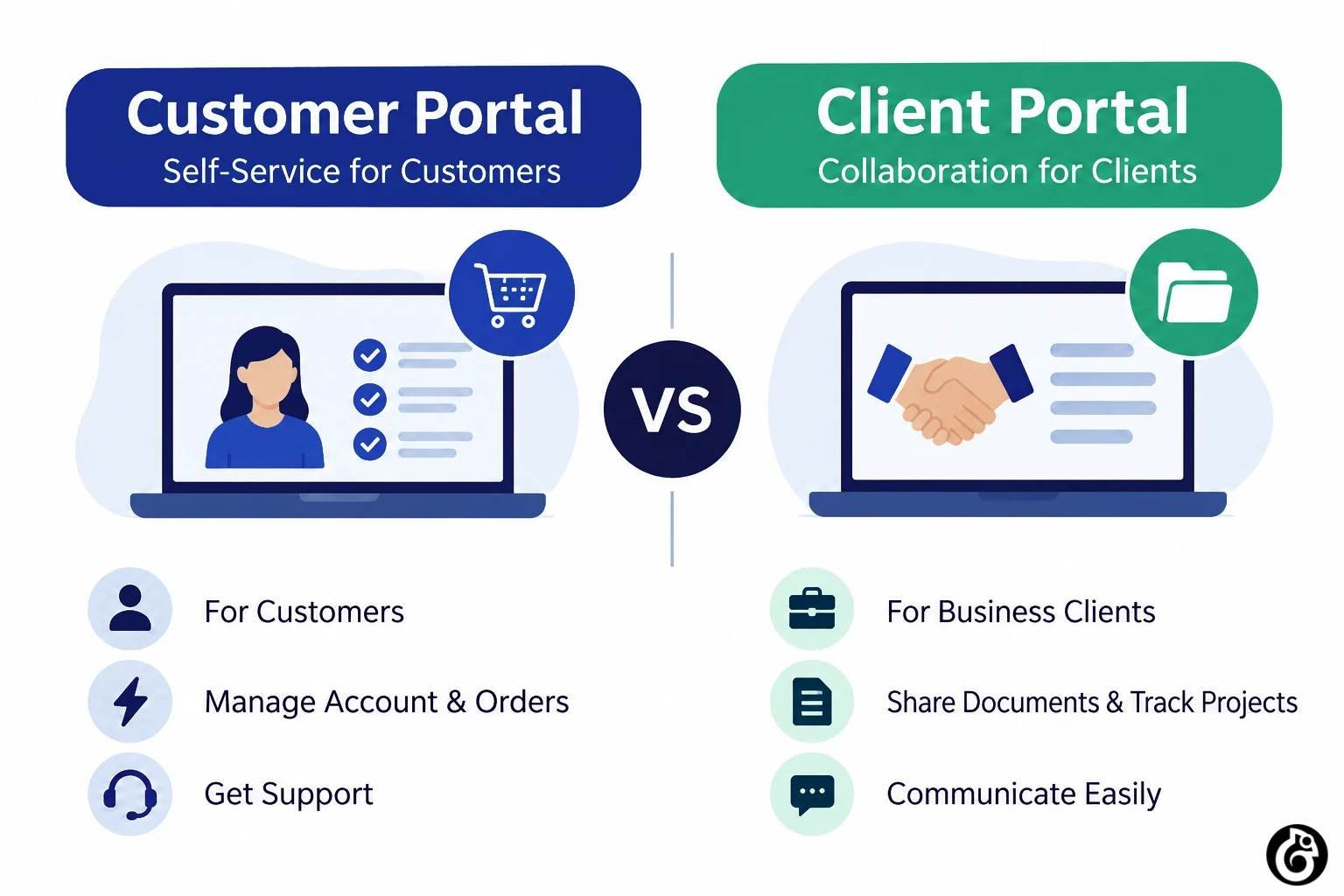
Customer Portal vs. Client Portal: Key Differences
Although customer portals and client portals share several technical capabilities, their primary objectives are different. The distinction is mainly determined by the type of audience being served and the nature of the business relationship.
The following comparison highlights the major differences.
Comparison Factor |
Customer Portal |
Client Portal |
|---|---|---|
| Primary purpose | Customer self-service and support | Client collaboration and relationship management |
| Target audience | Individual customers and product users | Business clients and professional service recipients |
| Main focus | Customer experience and convenience | Service delivery and collaboration |
| Communication | Support requests and automated updates | Direct communication and project discussions |
| Information shared | Orders, accounts, subscriptions, and support details | Contracts, documents, invoices, and project updates |
| Common features | FAQs, ticketing, order tracking, and billing | Document sharing, task tracking, and project dashboards |
| Access requirements | Customer account authentication | Often role-based and permission-controlled |
| Business applications | eCommerce, banking, healthcare, and SaaS | Agencies, consulting, legal, finance, and B2B services |
| Typical interaction | Frequently self-service and transactional | Often ongoing and relationship-based |
It should be noted that these differences are not strict technical rules. Some platforms are designed with a combination of customer-facing and client-facing capabilities. The final functionality is generally determined by business requirements, user expectations, and operational workflows.
Customer Portal vs. Client Portal: Which Features Does Your Business Need?
The right portal functionality should be selected according to the type of interaction that needs to be supported.
Features to Prioritize in a Customer Portal
When a customer portal is being developed, convenience and self-service functionality should be prioritized.
- Simple navigation: Information should be organized so that customers can quickly locate the required services.
- Automated support: Common questions should be addressed through FAQs, knowledge bases, and automated assistance.
- Account management: Customer profiles, orders, subscriptions, and payment details should be accessible.
- Mobile responsiveness: The platform should be optimized for smartphones, tablets, and desktop devices.
- CRM integration: Customer information should be synchronized with relevant business systems to improve service management.
An intuitive interface should also be created through custom UI/UX design services so that important activities can be completed with minimal effort.
Features to Prioritize in a Client Portal
For client portals, collaboration, security, and information management should be given greater importance.
- Secure document management: Confidential files should be shared through protected access.
- Project collaboration: Tasks, milestones, approvals, and project updates should be organized.
- Personalized dashboards: Relevant business information should be displayed according to each client’s requirements.
- Financial management: Invoices, payment statuses, and transaction records should be accessible.
- Communication tools: Messages, discussions, and notifications should be centralized.
Through these features, client interactions can be managed more efficiently and service delivery can be made more transparent.
Benefits of Customer Portal Development
Customer portal development can provide several operational and customer experience benefits.
1. Improved Customer Experience
Important services and account information can be accessed from a single location. As a result, customers can be provided with greater convenience and control over their interactions.
2. Reduced Support Workload
Common questions and service requests can be handled through self-service tools. Consequently, support teams can spend more time addressing complex customer concerns.
3. Faster Access to Information
Orders, invoices, subscriptions, and support updates can be made available through centralized dashboards, reducing unnecessary communication delays.
4. Better Customer Engagement
Personalized notifications, service updates, and account-related information can be used to maintain regular customer engagement.
5. Increased Operational Efficiency
Several repetitive activities can be automated, allowing business processes to be managed with fewer manual steps.
6. Improved Customer Retention
A convenient and reliable digital experience can contribute to stronger customer satisfaction and long-term engagement.
Benefits of Client Portal Development
Client portals can provide important benefits to service-based and B2B businesses.
1. Stronger Client Relationships
Regular communication and transparent information sharing can be supported through a centralized platform, helping stronger professional relationships to be maintained.
2. Improved Business Communication
Project discussions, updates, approvals, and important documents can be organized in one place, reducing communication gaps.
3. Better Project Transparency
Project milestones, deadlines, and progress reports can be shared so that clients can remain informed throughout service delivery.
4. Secure Document Exchange
Sensitive documents can be shared through controlled access permissions and secure authentication mechanisms.
5. Simplified Workflow Management
Approvals, task assignments, document requests, and other repetitive activities can be organized through automated workflows.
6. Greater Productivity
Time spent searching for documents, sending repeated updates, and managing separate communication channels can be reduced.
Customer Portal vs. Client Portal: Which One Should Your Business Build?
The selection should be based on the primary audience, business model, and digital experience that needs to be delivered.
When Should You Choose a Customer Portal?
A customer portal should be considered when customers are expected to access services independently and manage their accounts without requiring frequent assistance.
It can be particularly useful when:
- A large customer base needs access to account information.
- Order tracking and service updates are required.
- Customer support requests need to be managed efficiently.
- Subscription and billing activities need to be simplified.
- Self-service functionality is expected to reduce operational workload.
For example, an online subscription business can use a customer portal through which plans, invoices, payment methods, and subscription renewals can be managed.
When Should You Choose a Client Portal?
A client portal should be considered when ongoing collaboration, secure information sharing, and personalized service delivery are required.
It can be a suitable choice when:
- Long-term client relationships are maintained.
- Project documents and confidential files need to be shared.
- Multiple tasks and approvals need to be coordinated.
- Clients require regular progress updates.
- Communication and financial information need to be centralized.
For example, a software development agency can provide a client portal through which project timelines, deliverables, feedback, invoices, and development updates can be monitored.
Can a Business Use Both Customer and Client Portals?
Yes. Both portal types can be implemented by a business when different audiences and workflows need to be supported. For example, a software company may provide a customer portal for subscription management, product support, and billing. At the same time, a separate client portal may be provided to enterprise customers for project collaboration, implementation updates, and dedicated account management.
Alternatively, both experiences can be combined within one platform through separate dashboards, user roles, and permission settings. The appropriate architecture should be selected according to the complexity of the business, the number of user groups, and the information that needs to be accessed.
Essential Considerations Before Developing a Business Portal
Before development is started, several important factors should be evaluated to ensure that the final platform is aligned with business objectives.
1. Business Requirements and Objectives
The primary purpose of the portal should be clearly defined. The activities to be supported, problems to be addressed, and expected outcomes should be identified before development begins.
2. Target Audience and User Expectations
The needs of customers and clients should be evaluated separately. Their expectations, technical familiarity, and preferred interaction methods should be considered during planning.
3. Feature Selection and Prioritization
Only the features required to support essential workflows should be prioritized during the initial development phase. Additional functionality can be introduced as business requirements evolve.
4. UI/UX Design and Navigation
A simple and intuitive interface should be created so that users can access information without unnecessary complexity. Consistent navigation, responsive layouts, and accessible design elements should be considered.
5. Security and Data Protection
Authentication, encryption, role-based access control, and secure data storage should be implemented according to the sensitivity of the information being handled.
6. Third-Party Integrations
CRM platforms, payment gateways, accounting software, communication tools, and other business systems may need to be connected to support existing workflows.
7. Scalability and Performance
The platform should be designed to support future growth. Its architecture should be capable of handling increasing users, data volumes, and functionality requirements.
8. Maintenance and Future Improvements
Regular updates, security checks, performance monitoring, and technical maintenance should be planned to ensure that the portal remains reliable.
For businesses planning a large-scale platform, enterprise software development solutions can be considered to support complex workflows, integrations, security requirements, and long-term scalability.
How Much Does It Cost to Develop a Customer Portal or Client Portal?
The cost of developing a customer portal or client portal can vary depending on functionality, design complexity, integrations, security requirements, and development time.
The following figures can be used as indicative planning estimates.
Portal Complexity |
Estimated Development Cost |
|---|---|
| Basic portal | $5,000–$15,000 |
| Mid-level portal | $15,000–$35,000 |
| Advanced portal | $35,000–$75,000 |
| Enterprise-level portal | $75,000–$150,000+ |
A basic portal may include user authentication, account management, and a simple dashboard. In comparison, advanced platforms may include project management, automated workflows, third-party integrations, advanced reporting, and multiple user roles.
The final cost can be influenced by:
- Number and complexity of required features.
- Custom UI/UX design requirements.
- Backend architecture and database design.
- Security and compliance requirements.
- Third-party API integrations.
- Mobile responsiveness and cross-device compatibility.
- Testing, deployment, and ongoing maintenance.
For startups and businesses with limited initial budgets, MVP development services can be considered. Through an MVP approach, essential portal functionality can be launched first, user feedback can be collected, and additional features can be introduced in later development phases.
Why Choose Beadaptify for Customer Portal and Client Portal Development?
The successful development of a business portal requires more than the implementation of login screens and dashboards. User requirements, business workflows, security, scalability, and overall usability must be considered throughout the development process.
At Beadaptify, customized digital solutions are developed around business objectives and user expectations. Whether a customer self-service platform or a feature-rich client collaboration portal is required, the development approach can be aligned with the specific needs of the business.
Through professional design and development, the following capabilities can be supported:
- Custom Portal Development: Tailored portal functionality can be developed according to business workflows and user requirements.
- User-Focused Interface Design: Intuitive interfaces and navigation experiences can be created to simplify user interactions.
- Secure Architecture: Authentication, access permissions, and data protection mechanisms can be incorporated.
- Third-Party Integrations: Relevant CRM, payment, communication, and business management tools can be integrated.
- Scalable Development: Flexible architecture can be implemented to accommodate future business growth.
- Ongoing Technical Support: Maintenance, improvements, and additional functionality can be supported as requirements evolve.
With a focus on design & development services and custom digital solutions, businesses can be supported throughout the planning, design, development, and deployment stages.

Conclusion
Customer portals and client portals are both valuable digital solutions, but they are designed to support different types of business interactions. Customer portals are generally focused on self-service functionality, account management, and customer support. Client portals, on the other hand, are primarily designed for collaboration, secure document sharing, project management, and ongoing professional relationships.
The right solution should be selected according to the business model, target audience, and functionality required. In some cases, both experiences can be combined within a single platform to support different user groups.
By defining clear requirements, prioritizing essential features, and selecting the right development approach, a secure and scalable portal can be created to improve digital interactions and operational efficiency.
Whether a customer portal or a client portal is being planned, the right technology and development strategy can turn it into a valuable long-term business asset.
FAQs on Customer Portal vs. Client Portal
Are customer portals and client portals the same?
No. Although similar technologies may be used, their primary purposes are different. Customer portals are generally focused on customer convenience and support, whereas client portals are more focused on personalized service delivery and professional collaboration.
What are the main features of a customer portal?
Common customer portal features include account management, order tracking, online payments, support ticket management, FAQs, notifications, and self-service tools.
What are the essential features of a client portal?
A client portal may include secure login, document sharing, project tracking, client messaging, invoice management, appointment scheduling, personalized dashboards, and role-based access controls.
Can a customer portal also be used as a client portal?
Yes. Both functionalities can be combined within one platform by creating separate dashboards, user roles, and access permissions. This approach can be useful when different audiences need to access different services and information.